Field Types
The full catalog of field types, what each does, and when to use it. Most are custom field types you can add to a task. The Files and Computed groups below — attachment, formula, and serial — are DataTable column types rather than task fields (tasks do have their own built-in attachments as a separate feature).
Strings
| Type | Description | Example use |
|---|---|---|
text |
Single-line text | Codename, short note |
longtext |
Multi-line text | Notes, context |
email |
Email-validated string | Contact email |
phone |
Phone-formatted string | Customer phone |
link |
URL-validated string | External resource |
Numerics
| Type | Description | Example use |
|---|---|---|
number |
Plain number | Quantity, count |
currency |
Money with currency code | Revenue, cost |
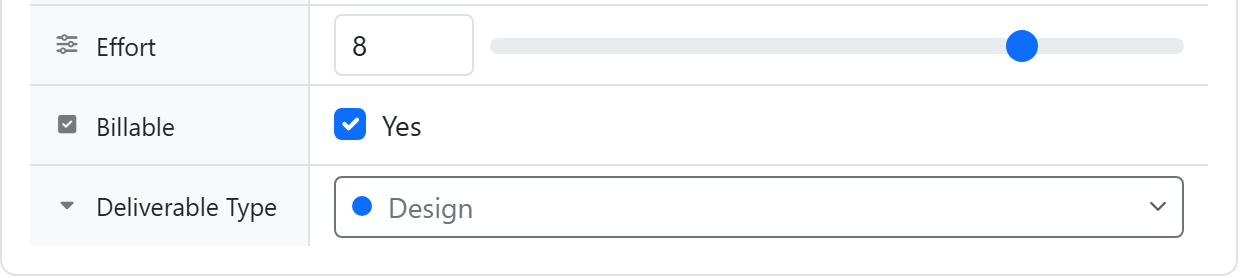
slider |
Number with min/max + step | NPS score (0-10), priority (1-5) |
Choices
| Type | Description |
|---|---|
dropdown |
Single-select from defined options (each option has a label + color) |
tags |
Multi-select from defined options |
Both show each option's label and color. You can rename an option later without breaking existing values.
Date / Time
| Type | Description |
|---|---|
date |
A single date, with optional time |
For ranges, use two date fields (start + end).
Boolean
| Type | Description |
|---|---|
checkbox |
True / false toggle |
People
| Type | Description |
|---|---|
people |
Multi-select from workspace members |
Filter and sort by display name.
Files
A DataTable column type — not a task custom field.
| Type | Description |
|---|---|
attachment |
One or more files attached to a cell |
Files are kept private — the same access rules as task attachments.
Computed
DataTable column types — not task custom fields.
| Type | Description |
|---|---|
formula |
Computed value from other columns on the same row. See Formulas |
serial |
Auto-incrementing serial with optional format (INV-{NNNNN}) |
| Linked Summary (rollup) | Aggregates values across linked rows (sum, count, average, min, max…). See Rollups |
Computed columns are read-only — you can't type into or override them through the app or API; the calculated value always wins.
Datatable links
| Type | Description |
|---|---|
datatable (default) |
Pick rows from a linked DataTable. Live values |
datatable (mode: "items") |
Show child rows that point back to this task |
See Datatable-link Fields for the full pattern.
Per-type configuration
Most fields have type-specific config:
- dropdown / tags — option list with colors
- slider — min, max, step
- currency — currency code (USD, EUR, ...)
- serial — format string
- datatable — target table, mode, display columns
Configured at definition time and editable from Settings → Fields.