Recurring Tasks
A recurring task clones itself forward — either on a schedule (daily, weekdays, weekly, monthly) or when you mark the current one complete. The original task stays put; a fresh copy appears at the next occurrence.
Recurring tasks are available on Pro and above — they ride the same scheduler as automations, which the Free plan doesn't include. On Free, existing repeat settings are kept but paused; upgrading resumes them.
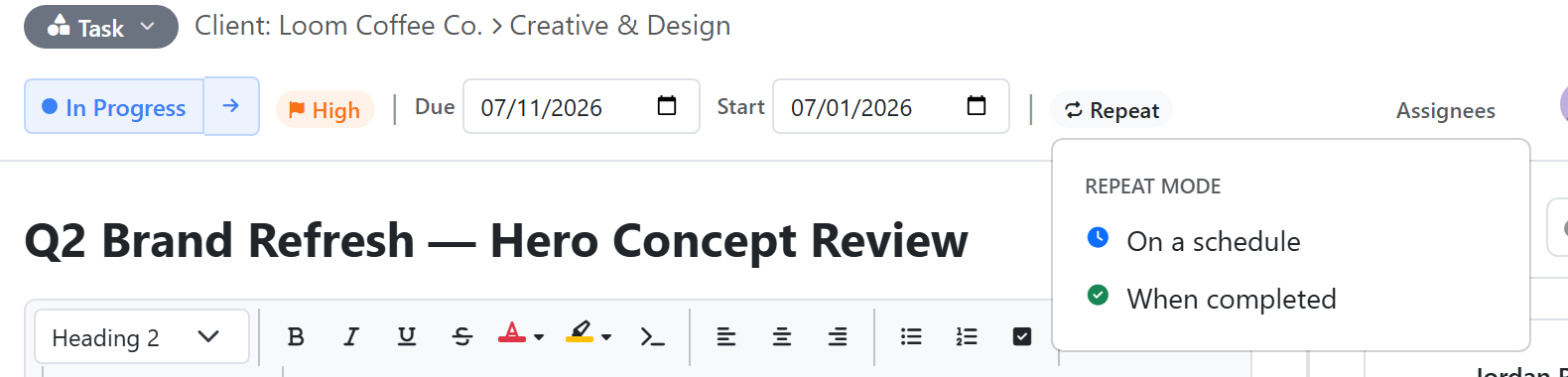
Two ways a task can repeat
| Mode | When the next copy appears |
|---|---|
| On a schedule | At a fixed cadence — daily, weekdays only, weekly on a specific day, or monthly on a specific date |
| When marked complete | Only after you check the current one off |
Pick on schedule for cadenced rhythms (standups, status reports, weekly 1:1s). Pick on complete for chore-style work where the next instance only matters once this one is finished.
Setting up recurrence
- Open the task detail panel
- Click the recurrence icon in the toolbar
- Pick a mode, frequency, and time — enter the time in your own local timezone, and Konduit converts it to the workspace timezone for scheduling
The first occurrence is whatever you're looking at. Konduit handles the clones from there.
To set an end date, ask the AI assistant — the manual recurrence picker doesn't have an end-date field.
What gets copied forward
| Carried over | Reset |
|---|---|
| Title, description, priority | Status (back to the list's first active status) |
| Time estimate, project, parent task | Comments, time entries, attachments |
| All custom field values | The repeat schedule (clones don't repeat themselves) |
| All assignees | Due date and start date (left blank — not recomputed from the schedule) |
Only the source task holds the schedule. Clones are one-shot — checking off a clone won't trigger another.
Stopping or changing recurrence
- Open the task, click the recurrence icon, then click the red trash/remove icon next to Save to turn recurrence off
- Changing the cadence updates the source task's schedule from that point forward — already-cloned occurrences are untouched
When to use an automation instead
Recurring tasks and recurring automations both run on a schedule, but they do different things:
| Goal | Use |
|---|---|
| A human needs to do work each cycle | Recurring task |
| Send an email or notification on a cadence | Recurring automation |
| Insert a row into a datatable on a cadence | Recurring automation |
| Generate a document on a cadence | Recurring automation |
The completion test: if someone needs to mark it done for the next one to matter, it's a recurring task. If it should just happen on its own, it's an automation.
Asking the AI assistant
The AI assistant understands recurrence directly:
- "Make the Daily Standup task repeat every weekday at 9am" — sets on-schedule recurrence
- "This task should recreate itself after I finish it" — sets on-complete recurrence
- "How do I make a task repeat?" — explains the steps without changing anything
If the task doesn't exist yet, the assistant will offer to create it first.