Workspaces
A workspace is a self-contained Konduit environment with its own users, spaces, lists, datatables, and billing. Most teams — including agencies — need only one. Instead of a separate workspace per client, you give each client its own space inside a single workspace (that's exactly how the demo is set up: one workspace with a space per client). Keeping everything in one workspace means shared people, datatables, dashboards, and cross-client reporting all just work.
You'd only create a second workspace for a genuinely separate organization — a different team, with its own members and its own billing — not for a new client, department, or project (use spaces and projects for those).
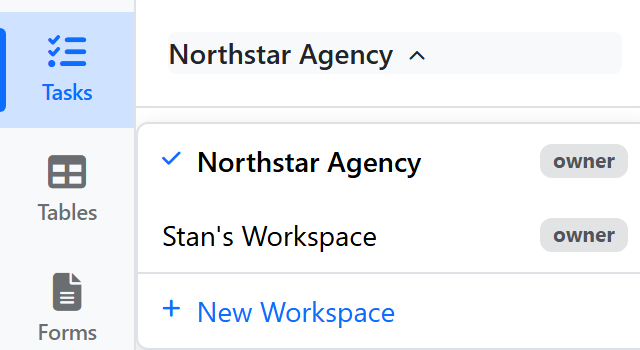
Switching workspaces
Click the workspace name in the top header (top-left, next to the Konduit logo) to open the workspace switcher. You'll see all workspaces you belong to — pick one to switch context.
Inviting members
Open Settings → Members to invite teammates by email. Each invite link expires in 7 days. Members get full access to non-private spaces and lists; for tighter control, use Member Groups (Business+) and resource access grants. See Guests & Members for the full breakdown of invites, roles, and groups.
Member roles
| Role | Capabilities |
|---|---|
| Owner | Everything, including billing and member management |
| Admin | Everything except billing |
| Member | Create + edit content; can't manage workspace settings |
| Guest | Read + comment only, and only on the resources you share with them (Pro and above) — see Members & Guests |
Plans
A workspace has a single plan — Free, Pro, Business, or Scale. The plan determines limits on members, datatables, AI credits, and feature access. See pricing.
Next
- Spaces & Folders — organize work inside the workspace
- FAQs