Projects
A Project is a cross-cutting initiative that spans tasks across multiple lists. Projects let you track everything related to a goal (e.g. "Q4 launch", "Client onboarding", "Migration to Stripe") regardless of which list each task lives in.
Projects vs Spaces
| Project | Space | |
|---|---|---|
| Purpose | Time-bounded initiative | Persistent organizational grouping |
| Membership | Tasks across many lists | Tasks within a single space |
| How many | Many tasks per project | One space per task |
| Lifecycle | Has a start, middle, end | Long-lived |
A task can belong to one project at a time. A space contains every task in its lists.
Creating a project
From Projects in the sidebar (or + → Project), give it a name, an optional description, a single optional Target date, a visibility setting, a color, and an icon. New projects start with a status of Active automatically — there's no start-date, owner, or status input on the create form.
Adding tasks
Open any task → set the Project field in the right panel. The task now appears in that project's roll-up. You can also add tasks from inside the project with + Add task (create a new one) or Link existing (pull in a task that already lives in some list).
Views: Plan, By Space, Gantt
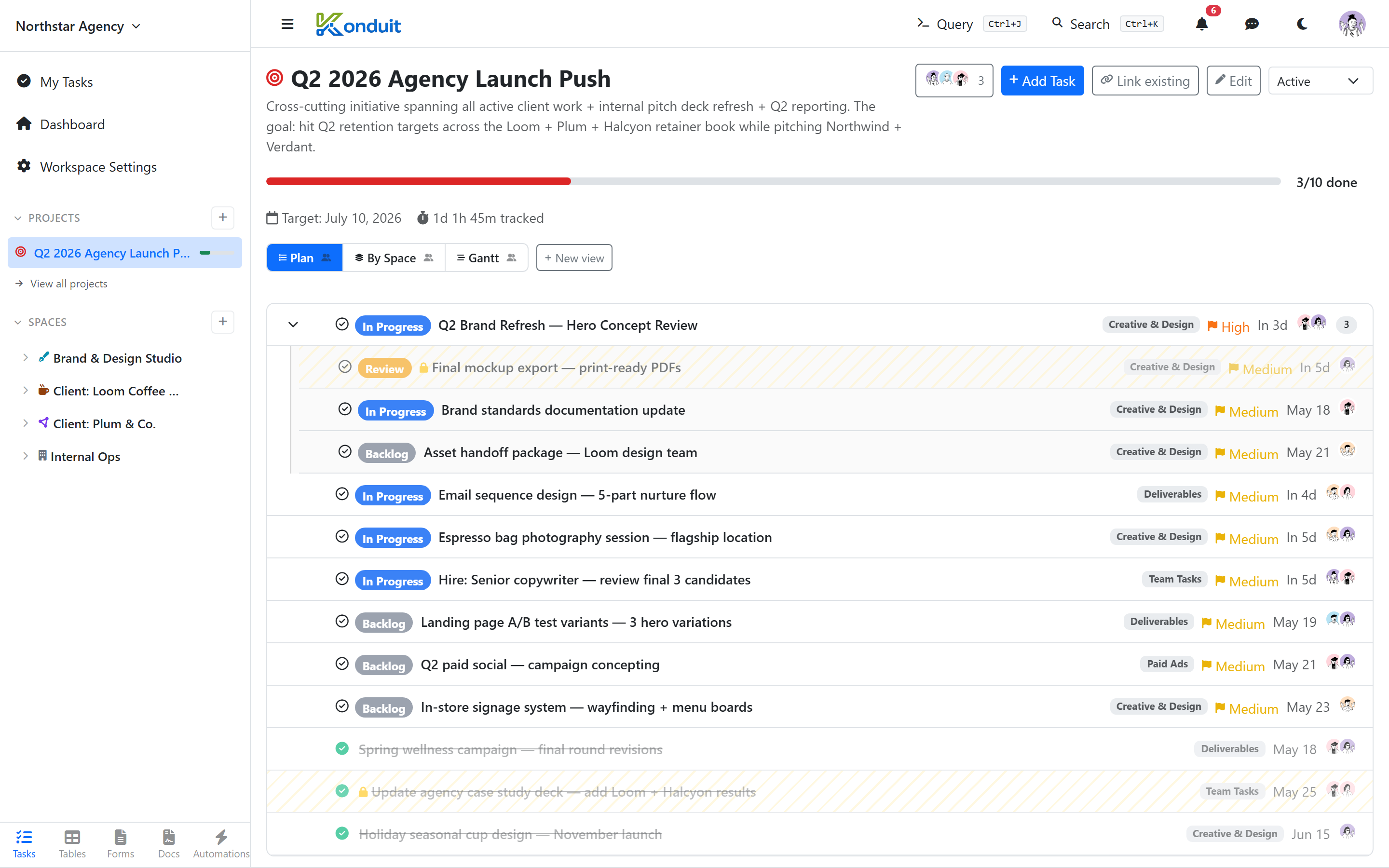
Every project opens on its Plan view — one flat list of all the project's tasks, in priority order. The order is the priority: drag any task up or down to reprioritize, and the new order sticks for everyone.
Parent tasks carry their subtasks in a collapsible accordion — a chevron and a count badge (e.g. 3) sit next to the parent. Expand it to see the subtasks inline, collapse it to keep the list scannable, and drag subtasks to reorder them within their parent. So a project reads top-to-bottom as "what matters most," with each headline task's breakdown tucked underneath it.
Two more views sit alongside Plan as tabs:
- By Space — the same tasks grouped by the space each one lives in, so you can see how the initiative spreads across your workspace.
- Gantt — a timeline with dependency lines and drag-to-reschedule (see Gantt).
Project progress
A project's header shows a simple progress bar (X of Y tasks done) alongside its Target date and a time tracked total. There's no burndown chart or per-project custom widgets — configurable widget dashboards are workspace-scoped, not project-scoped.
Closing a project
A project's status is one of Active, Completed, or Cancelled — a fixed set, not customizable (there's no "Done" or "Archived" status and no archive action). Marking a project Completed or Cancelled removes it from the active project list in the sidebar.